
Fix Teams meetings that are an hour off after the time change
A Teams meeting is an Outlook calendar event with a join link, so when the event is an hour off, the Teams meeting is too. Fix the Outlook event and the time shown for the meeting is corrected.
Scan my calendar (first 10 fixes free)Sign in
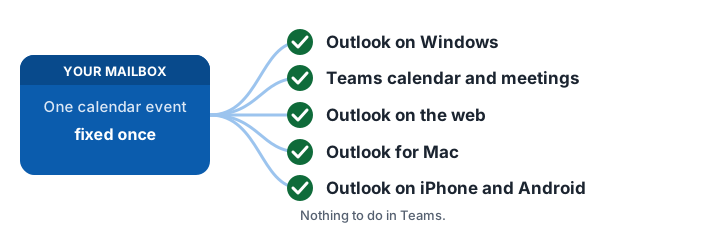
One fix, everywhere: Outlook and Teams
You do not fix Outlook first and Teams later. A Teams meeting is the same calendar event as the one in Outlook, with a join link. The app changes that one event in your mailbox, so Outlook on Windows, Mac, web and phone and the Teams calendar all show the corrected time after a single fix. There is nothing to open or change in Teams.
What this fixes
- Teams meetings you organized that are stored in a US time zone.
- Recurring Teams meetings: see recurring meetings.
What this does not fix
Microsoft lists other Teams features, such as scheduling and notifications, as under review, and Teams Events, Auto Attendant and Teams Rooms displays have had their own time zone problems. Those are Microsoft settings, outside this app. This app only changes calendar events in your mailbox. Because the fix edits the mailbox event itself, one fix is what Outlook on every device, the Teams calendar and Outlook mobile all show. It does not cover Teams town halls and webinars, Bookings, shared or group mailboxes, or secondary calendars. Meetings organized by someone else can only be fixed by their organizer; the app lists them and prepares an email to each.
Scan my calendar (first 10 fixes free)Sign in
Related pages
All provinces and pricing · Recurring meetings · Outlook for Mac and iPhone · British Columbia · Alberta · Manitoba
Frequently asked questions
Do I have to fix Outlook and Teams separately?
No. One fix covers both. A Teams meeting is the same calendar event you see in Outlook, with a join link, and the app corrects that event in your mailbox. Outlook on Windows, Mac, web and phone and the Teams calendar all show the corrected time after a single fix.
Why is my Teams meeting an hour off after the time change?
A Teams meeting is an Outlook calendar event with a join link, so it has the same stored-time-zone problem. Fixing the Outlook event fixes the time shown for that meeting.
Why are my Outlook meetings showing an hour late after the time change?
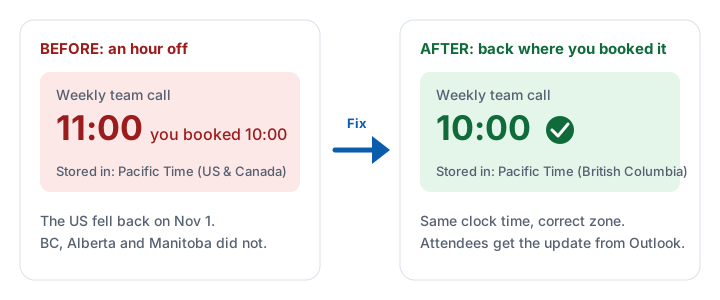
Events you booked before the Windows update are stamped with a US time zone such as Pacific Standard Time. On Nov 1, 2026 the US fell back an hour but British Columbia, Alberta and Manitoba did not, so those events now land an hour away from where you booked them. Existing events do not move to the new zone by themselves.
Do I need to update meetings I was invited to?
You cannot fix those yourself, because only the organizer can change a meeting’s time zone. The app lists the meetings you were invited to and prepares a ready-to-send email asking each organizer to fix theirs.
Will Outlook fix my meetings automatically?
No. Microsoft’s guidance says existing events are not migrated automatically and that only the organizer can change an event’s time zone. Microsoft’s free Exchange Online cmdlet covers single (non-recurring) meetings only and has to be run by an administrator.
Do I need my IT administrator?
You do not have to be an administrator to scan and fix your own calendar: you sign in with your own Microsoft account. Some organizations restrict users from approving apps, and then an administrator has to approve it once.